Description

After building the Assembly Runner, Belle is so confident that she decided to challenge herself a little by creating a whole language of her own and even giving it a quite... exquisite name: Brainfah.
Brainfah is a very simple but Turing Complete programming language, which means it can theoretically compute any computable problem.
The language uses a simple machine model consisting of:
- An array of $30000$ memory cells, with each cell starting at zero.
- A pointer that moves left or right across the cells, starting at cell $0$.
- Eight single-character commands that manipulate the cells and pointer.
- The program will stop when it reach after the last command.
Brainfah's 8 symbols:
>: Move the memory pointer to the next cell to the right.<: Move the memory pointer to the next cell to the left.+: Increase the value in the current cell by one.-: Decrease the value in the current cell by one..: Output the ASCII character of the value in the current cell.,: Read a character input into the current cell.[: Jump forward to the matching]if the current cell is zero.]: Jump back to the matching[if the current cell is not zero.
Example program
### Input
>+++++++++[<++++++++>-]<.>,+.
B
>+++++++++[<++++++++>-]<.>,+.
B
### Output (no new line)
HC
HC
Example explanation
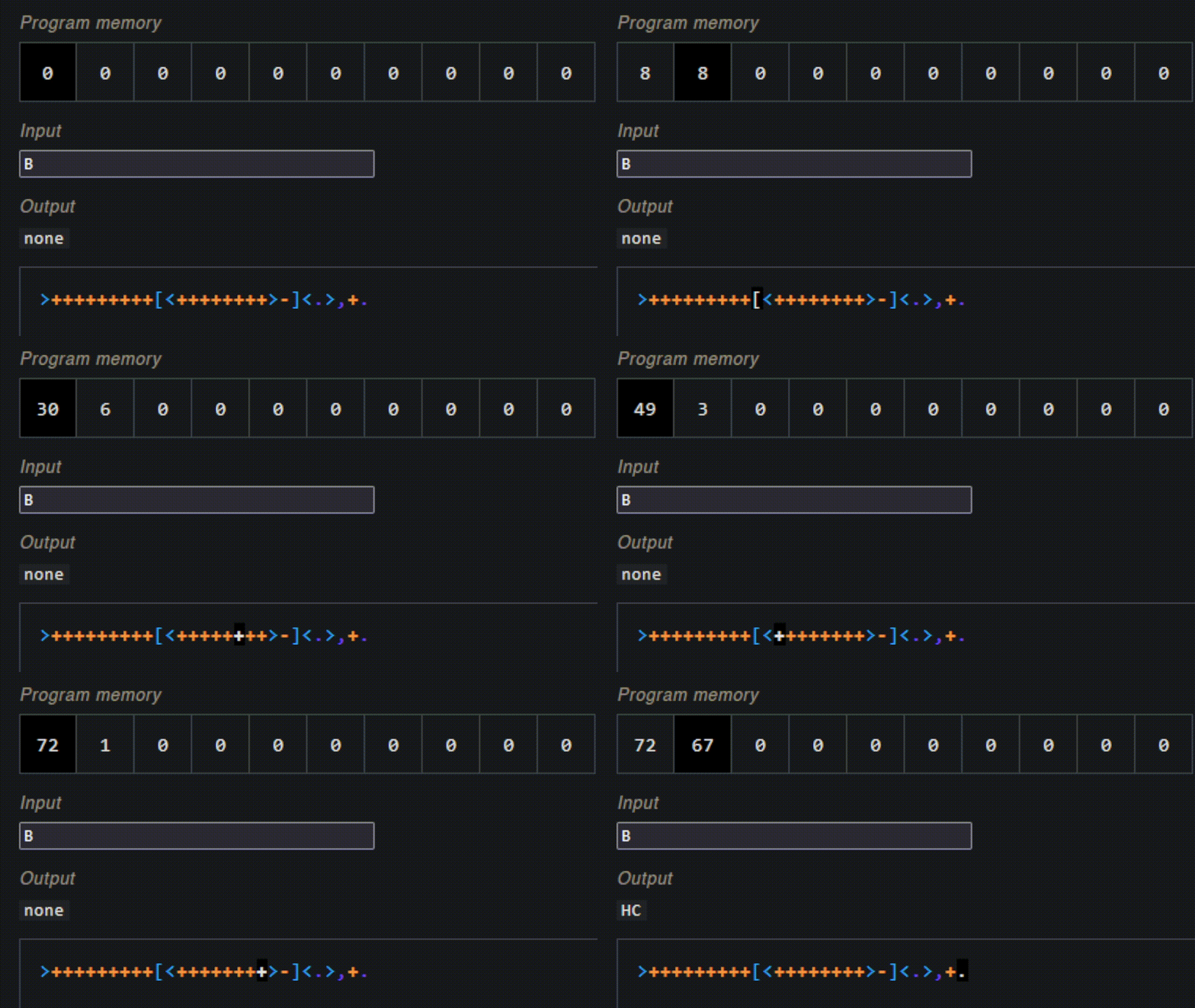
The program does the following:
- Move the pointer to the second cell
- Add $9$ to the second cell
- For each count in the second cell, add $8$ to the first cell, totalling $9*8 = 72$ count, which is the ASCII code for
H - Print the ASCII character with code in the first cell, which is $72$
- Read the input
Binto the second cell, which turns into $66$ - Add $1$ to the second cell
- Print the ASCII character with code in the second cell, which is $67$
Hints
- You can use print without adding new line characters by
print(str, end="") - You can convert a number to its ASCII character by using
character = chr(number) - You can convert a character to its ASCII number by using
number = ord(character)
Input
- The first line will contain the source code for the program
- The second line will contain the input for the program. You have to append a null character
\0to the end of this input string for the program to work properly. - All testcases will have a non-empty second line, even if the program doesn't require it.
- The program is guaranteed to be correct. It will not print out cells with negative value.
Testcases
- Testcase $1$-$3$: Programs will only contain the symbols
>,<,+,-,.,, - Testcase $4$-$7$: No restriction.
Output
The output of the program. Do not print the new line character \n if it's not what the source code output.