| # | Problem | Pass Rate (passed user / total user) |
|---|---|---|
| 11804 | cheat sheet (final) |
|
| 12845 | Integer pointer array |
|
| 12846 | Reverse Linked List ver 2 |
|
| 12847 | Small Cat Society |
|
| 13101 | Let's solve the last ouo |
|
Description
Cheat Sheet
printf() and scanf() format
printf("%d", n);
FORMAT ARGUMENT TYPE
%d, %i int decimal
%u unsigned int
%x unsigned int hexadecimal
%#x unsigned int hexadecimal with prefix 0x
%f double
%Lf long double
%e, %E double scientific notation
%c int to print a character
%s char * string (character array ended with '\0')
%p void * print memory address
%g, %G double %f or %e depending on the length
scanf("%d", &n);
FORMAT ARGUMENT TYPE
%d int * &n, store the input integer in n
%ld long *
%lld long long *
%u unsigned int *
%f float * read float
%lf double * read double
%Lf long double * read long double
%c char * read 3 characters %3c
%s char * read a string until whitespace
%n int * with %s, to get string length
char a[100]; int len;
scanf("%s%n", a, &len);
len will have the string length
Frequently used functions
#include <string.h>
char str[10];
scanf("%s", str);
to get the string length using strlen(str)
to compare two strings strcmp(str1, str2) ==0 if equal
to compare the first n chars of two strings strncmp(str1, str2, n) ==0 if equal
to copy str2 to str1 strcpy(str1, str2)
to copy the first n chars of str2 to str1 strncpy(str1,str2, n) remember to add '\0' to str1
#include <ctype.h>
isspace(ch), islower(ch), isupper(ch), isdigit(ch)
isalpha(ch), toupper(ch), tolower(ch)
To create a 5-by-5 two-dimensional array, we need to write
int a[5][5];
It will be indexed as follows:
How to read the following data?
1 2 3 4 5 e
#include <stdio.h>
int main(void)
{
int x;
while (scanf("%d", &x) == 1) {
printf("x=%d\n", x);
}
return 0;
}
How to read the following data?
2
L 5 2
D 5 3
#include <stdio.h>
int main(void)
{
char ch;
int i, n, row, col;
scanf("%d", &n);
for (i=0; i<n; i++) {
while(getchar()!='\n');
scanf("%c%d%d", &ch, &row, &col);
}
return 0;
}
Using for loops to print a two-dimensional array
for(i = 0; i < row; i++) {
for (j = 0; j < col; j++) {
printf("%5d", A[i][j]);
}
printf("\n");
}
Using bubble sort to rearrange an array A
for (i = 0; i < n; i++) {
for (j = 1; j < n; j++) {
if (A[j] > A[j-1]) {
/* swap A[j] A[j-1] */
}
}
}
operators:
! && || == != + - * / %
> < >= <=
How to avoid common errors and how to debug for OJ
1. Put the arrays in the 'global' area. Set their size bigger than required. Avoid using variable-length arrays (e.g. int arr[n];). Keep the array size fix (e.g., int arr[1000];).
2. After writing the code for reading input data, you may print out the data to check if your code reads them correctly. Do not proceed to write subsequent code before you confirm that.
3. If your program crashes, usually it is caused by memory related errors. Check the ranges of for-loops to see if your code attempts to read or write the elements out of the arrays’ boundary.
*(a+i) is equivalent to a[i]
(a+i) is equivalent to &a[i]
qsort :
you have to include <stdlib.h>
usage :
void qsort (void *array, size_t count, size_t size, comparison_fn_t compare);
qsort an int array
int compare_int (const void *a, const void *b)
{
const int *va = (const int *) a;
const int *vb = (const int *) b;
return *va-*vb;
}
qsort a double array
int compare_double (const void *a, const void *b)
{
const double *da = (const double *) a;
const double *db = (const double *) b;
return (*da > *db) - (*da < *db);
}
fgets
char *fgets(char *str, int n, FILE *stream)
gets
char *gets(char *str)
strtok
char *strtok(char *str, const char *delim)
strstr
char *strstr(const char *haystack, const char *needle)
Input
Output
Sample Input Download
Sample Output Download
Tags
Discuss
Description
Given an integer pointer array **ptr with size N, and an integer array *array with size (N+1)*N/2. Please use malloc function to allocate memory to **ptr and *array. The *array is an ascending sequence of numbers. Each pointer in array **ptr shall point to one element of *array. And the elements pointed by the **ptr are also ascending.
For example, when n = 5, the size of **ptr will be 5, and the size of *array will be 15. The first pointer of **ptr is *ptr[0] which points to array[0], and the second pointer of **ptr is *ptr[1] which points to array[1], and the third pointer of **ptr is *ptr[2] which points to array[3], and the fourth pointer of **ptr is *ptr[3] which points to array[6].
Input
The first line is size of **ptr
The second line is offset
offset < size <10000
Output
Print each pointer of **ptr + offset
Note that you need to print a newline character ‘\n’ after each number, that is, just one number will be shown in each line of the output.
Sample Input Download
Sample Output Download
Partial Judge Code
12845.cPartial Judge Header
12845.hTags
Discuss
Description
Given several operations, push x, pop, print, reverse, create a linked list dynamicly.
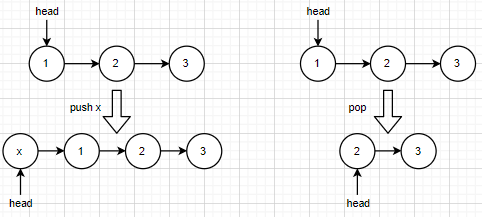
- push x: Add one Node (with data = x) at the front of linked list.
- pop: Delete the Node at the front of linked list.
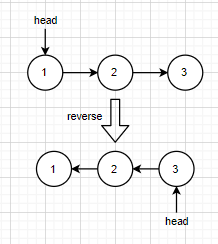
- reverse: reverse the current linked list
- print: output the linked list in given format.
You have to implement 3 functions:
1. void Push(Node** ptr_head,int x)
2. void Pop(Node** ptr_head)
3. void Reverse_List(Node** ptr_head)
Note: Modify the Node* head by Node** ptr_head
Input
There’re operations on several lines.
All operations are one of push x, pop, print, reverse.
It’s guaranteed that:
- Number of operations is less than 5,000,000
- Integer x is in [−1000,1000]
- The maximum length of linked list is less than 10,000.
Output
Output the linked list for every print.
Sample Input Download
Sample Output Download
Partial Judge Code
12846.cPartial Judge Header
12846.hTags
Discuss
Description
Wild cats take care of each other in the wild. However, when winter comes, the preys are not enough to feed all the cats.
In this problem, you are asked to help decide who can enjoy the precious food for three different categories of cats: apprentice, elder, and kitty.
First, the cats dine according to the following order of their occupations:
1. elder
2. kitty
3. apprentice
Then, except that the apprentices have the dining priority of the young over the old, for the other two occupations, the old have higher priority. If the occupations and the ages of two or more cats are the same, they will dine in lexicographic order according to their names.
Input
There are multiple test cases.
The first line of each test case contains two integers N and M, indicating the number of cats and the portions of food respectively, where 0<N,M<=10000.
The next N lines are the information of each cat, including name, occupation, and age.
The length of the names will not exceed 30 letters and will contain no spaces.
Output
Please output the cats that could eat the food in order, each name a line.
Sample Input Download
Sample Output Download
Tags
Discuss
Description
If you have read problem "13083 - Let's build a Vim editor" in Practice Final,
then you only need to read the bolded words,
since the rest are exactly same.
Vim is an editor to create or edit a text file.
There are two modes in Vim. One is the command(normal) mode and another is the insert mode.
In the command mode, user can move around the file, delete text, etc.
In the insert mode, user can insert text.

It's OK that you don't know how to exit Vim :)
The following commands are only used in command mode:
- h: move the cursor left
- l: move the cursor right (this is lowercase L, not uppercase i)
- x: delete the character at the cursor
- j: move the cursor down
- k: move the cursor up
In command mode, Vim also support a number combines with the above commands.
Let's suppose n is a number:
- nh: move the cursor left n times
- nl: move the cursor right n times
- nx: delete n characters backward from the current cursor.
- nj: move the cursor down n times
- nk: move the cursor up n times
To enter insert mode from command mode, the following commands are used:
- a: enter insert mode after the current cursor
- A: enter insert mode at the end of the line
- i: enter insert mode before the current cursor
- I: enter insert mode at the beginning of the line (this is uppercase i, not lowercase L)
To enter command mode (from insert mode or command mode), we pressed ESC (escape) to do that.
In this problem, we used "ESC" to represents that the user entered the escape key.
Vim also support repeating insert characters.
Let's suppose n is a number:
- na: enter insert mode after the current cursor
- nA: enter insert mode at the end of the line
- ni: enter insert mode before the current cursor
- nI: enter insert mode at the beginning of the line (this is uppercase i, not lowercase L)
After insert 0 or many characters in the insert mode,
as soon as the ESC is pressed (backing to command mode),
the Vim editor will automatically repeat the characters you insert n times.
For example, from starting from command mode,
"4AabcESC" will insert 4 "abc" at the end of the line.
At first, user is in the command mode,
and there are 1000 lines in the Vim editor. (Lines are already created, but all lines are empty)
Given the user input, output the text of the editor.
All test cases will end with ":wq" (without quotes) in command mode.
ouo.
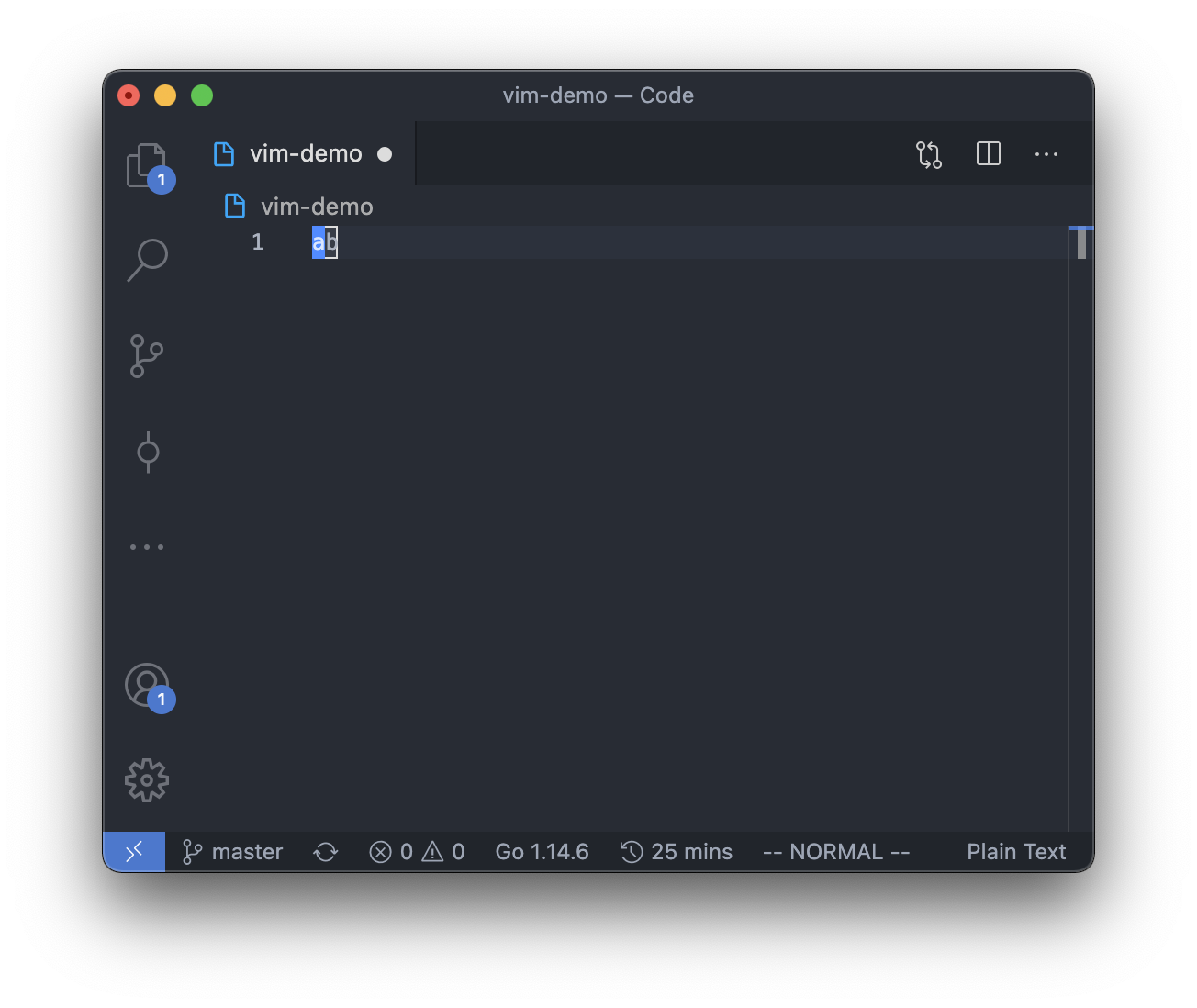
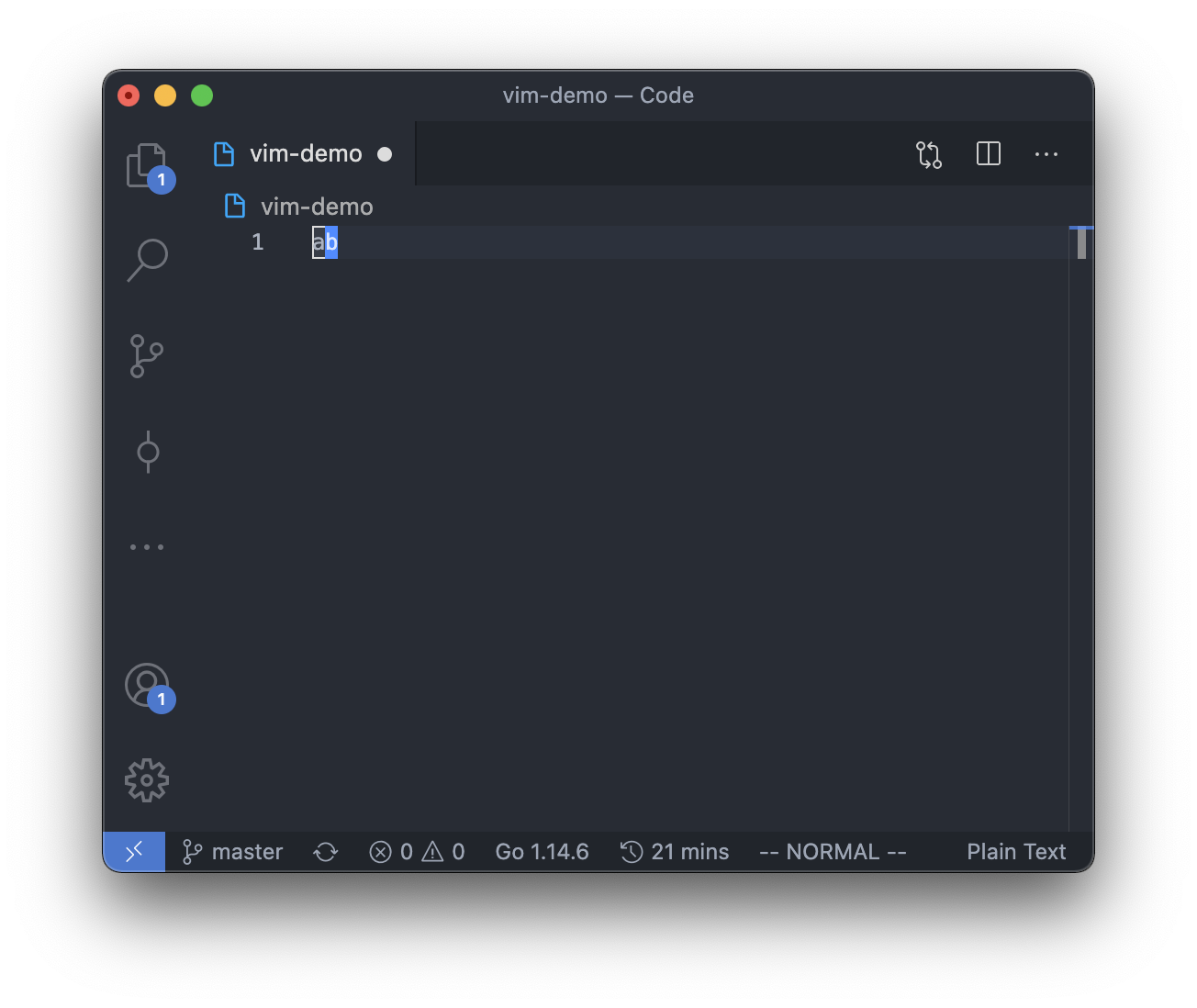
Note that in command mode, the cursor can only be on the character if there is any.
So there will be 2 possible positions for the cursor in command mode if the text in the editor is "ab".
And of course, if there is no text in the editor, the cursor can only be at the beginning of the line.
However, in insert mode, the cursor can be between, before or after any of the character,
so there will be 3 possible positions for the cursor in insert mode if the text in the editor is "ab".
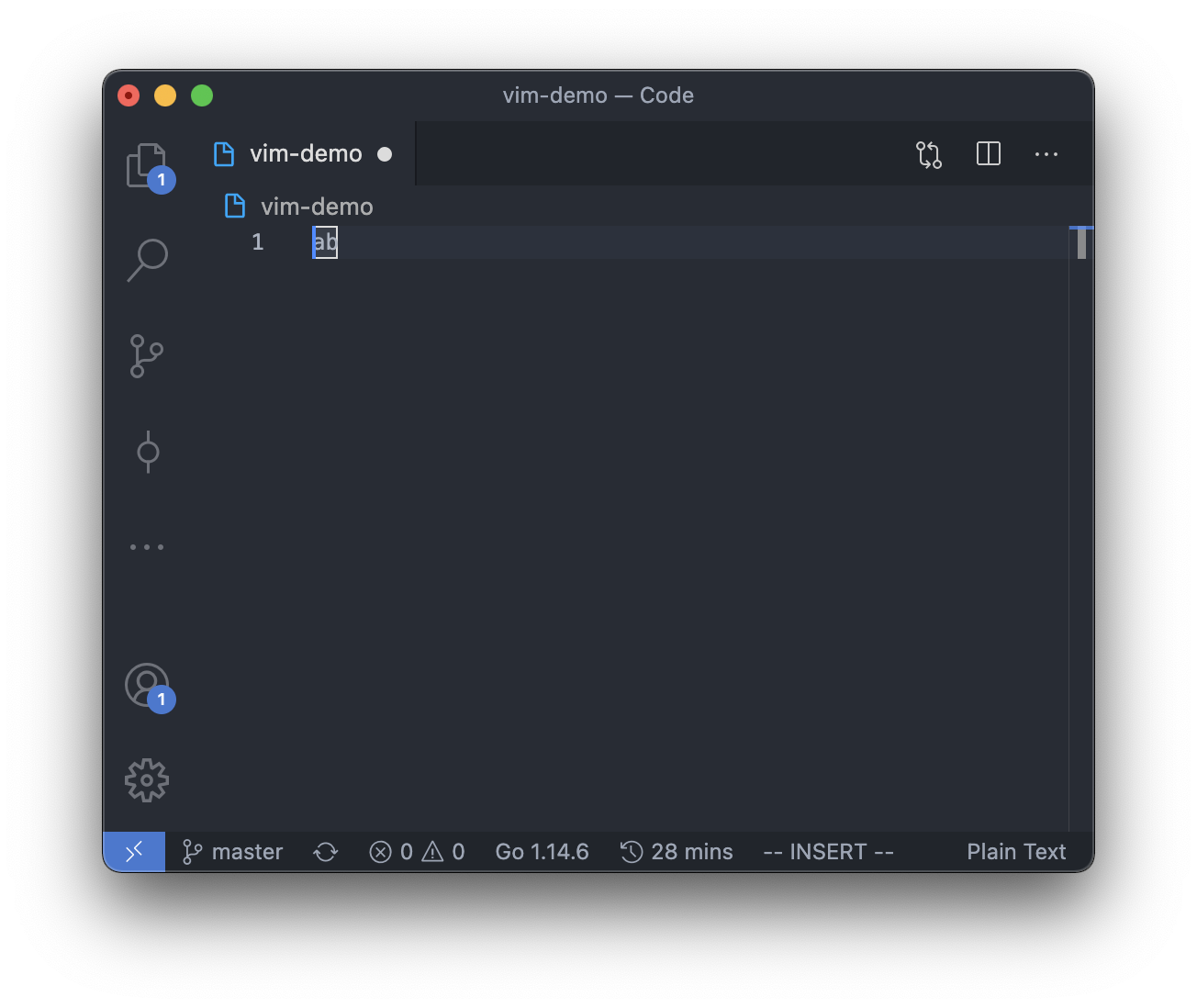
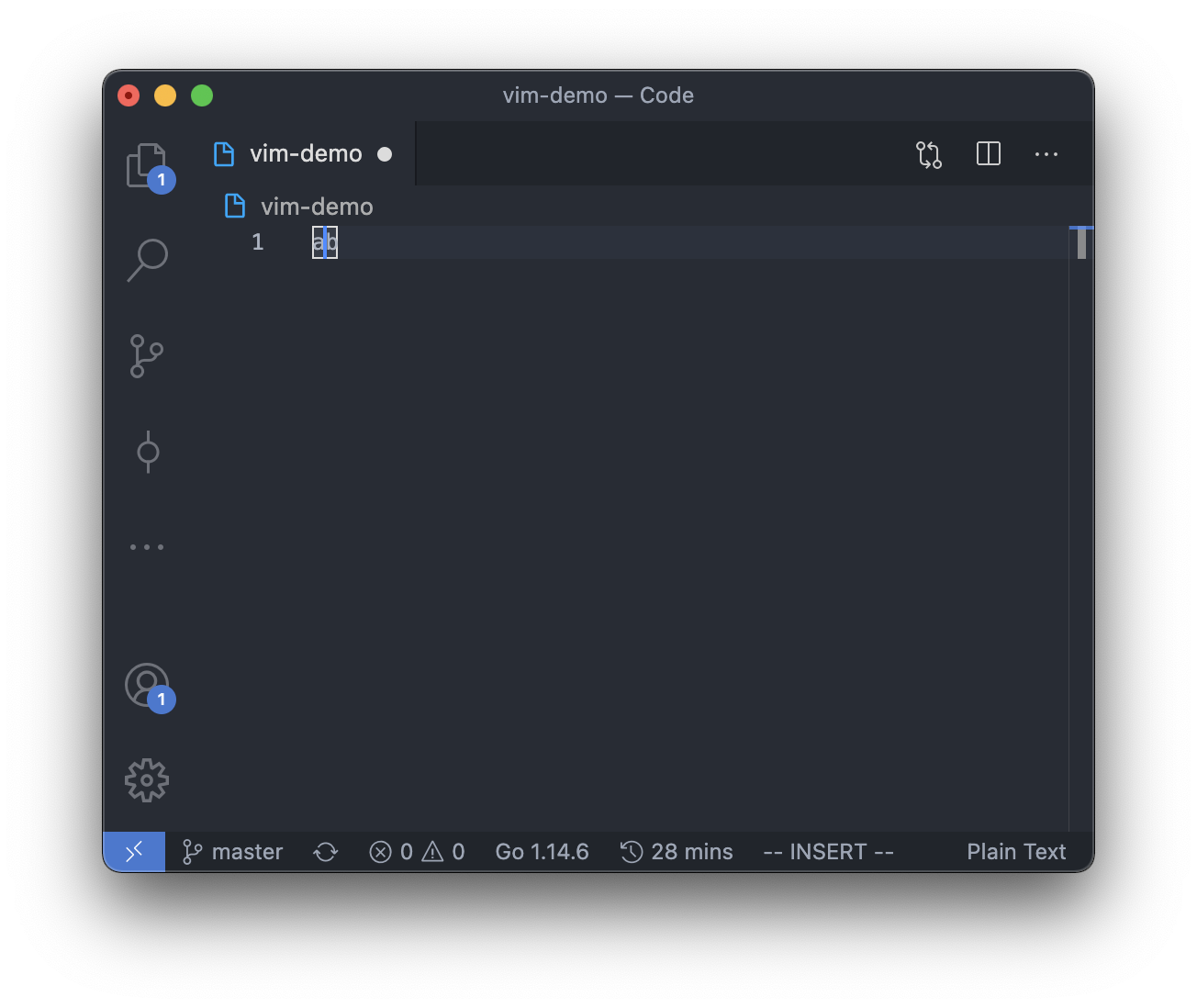
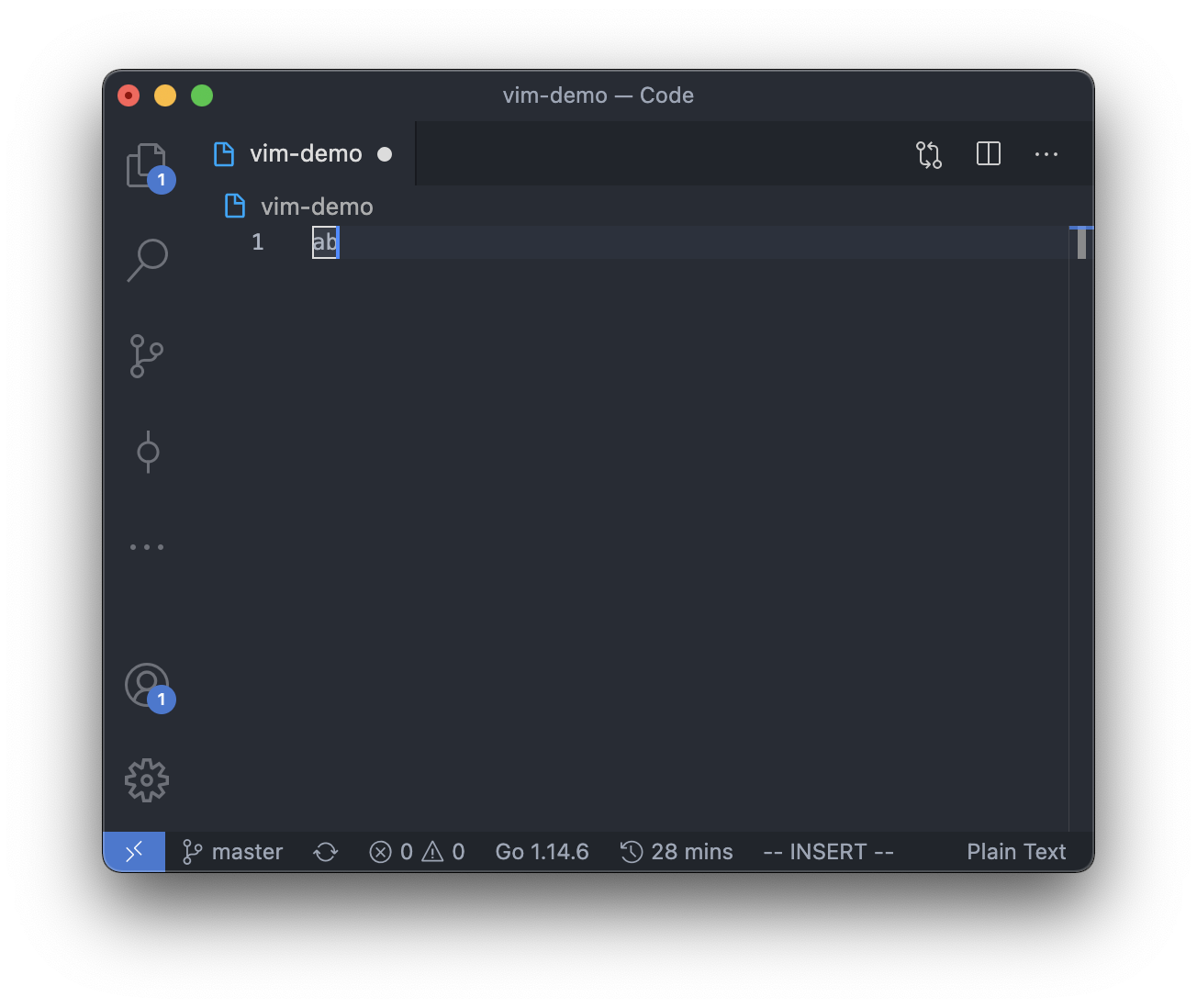
Note that for the difference between command 'a' and 'i':
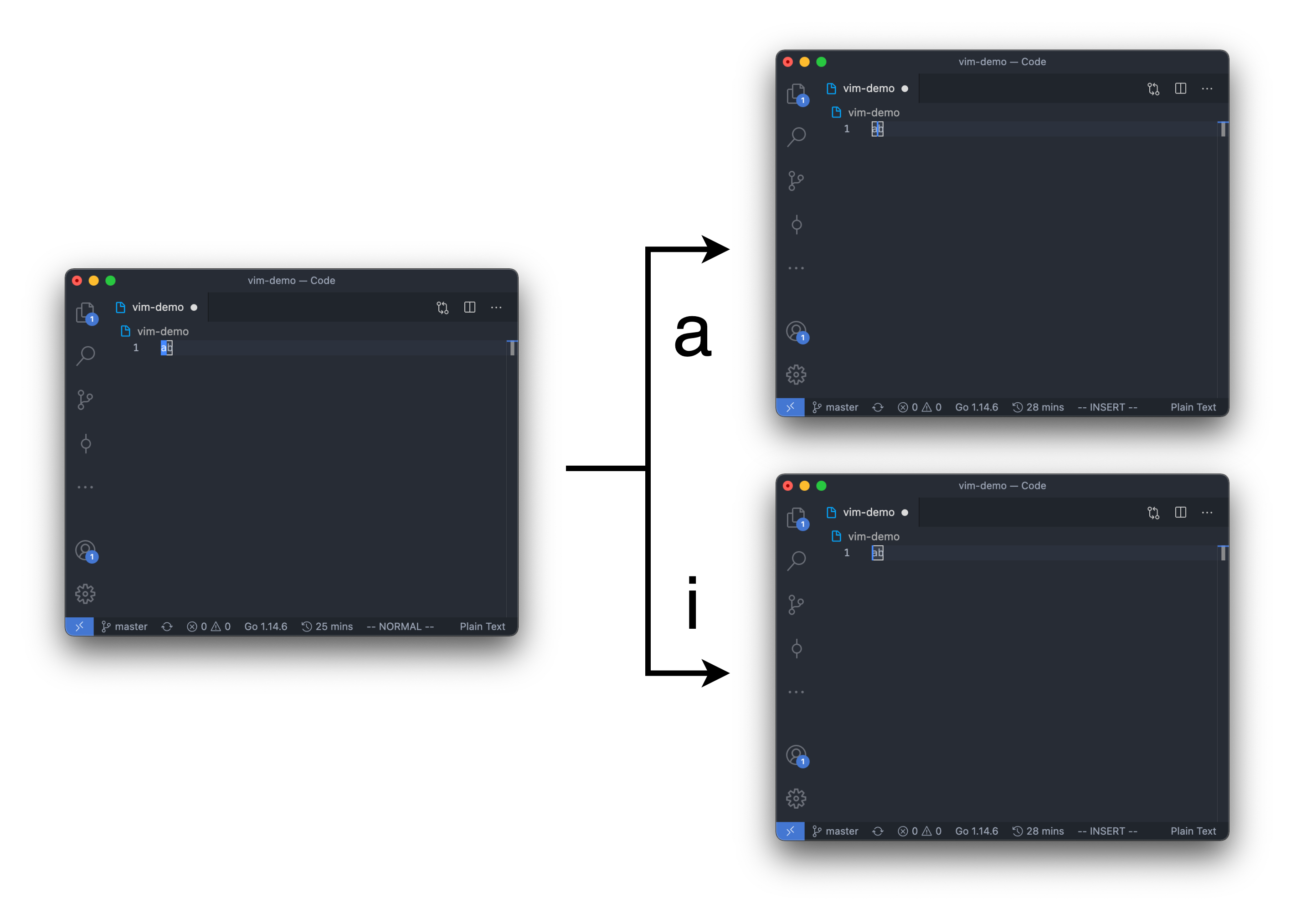
Note that the cursor position from insert mode to normal mode is act as below:
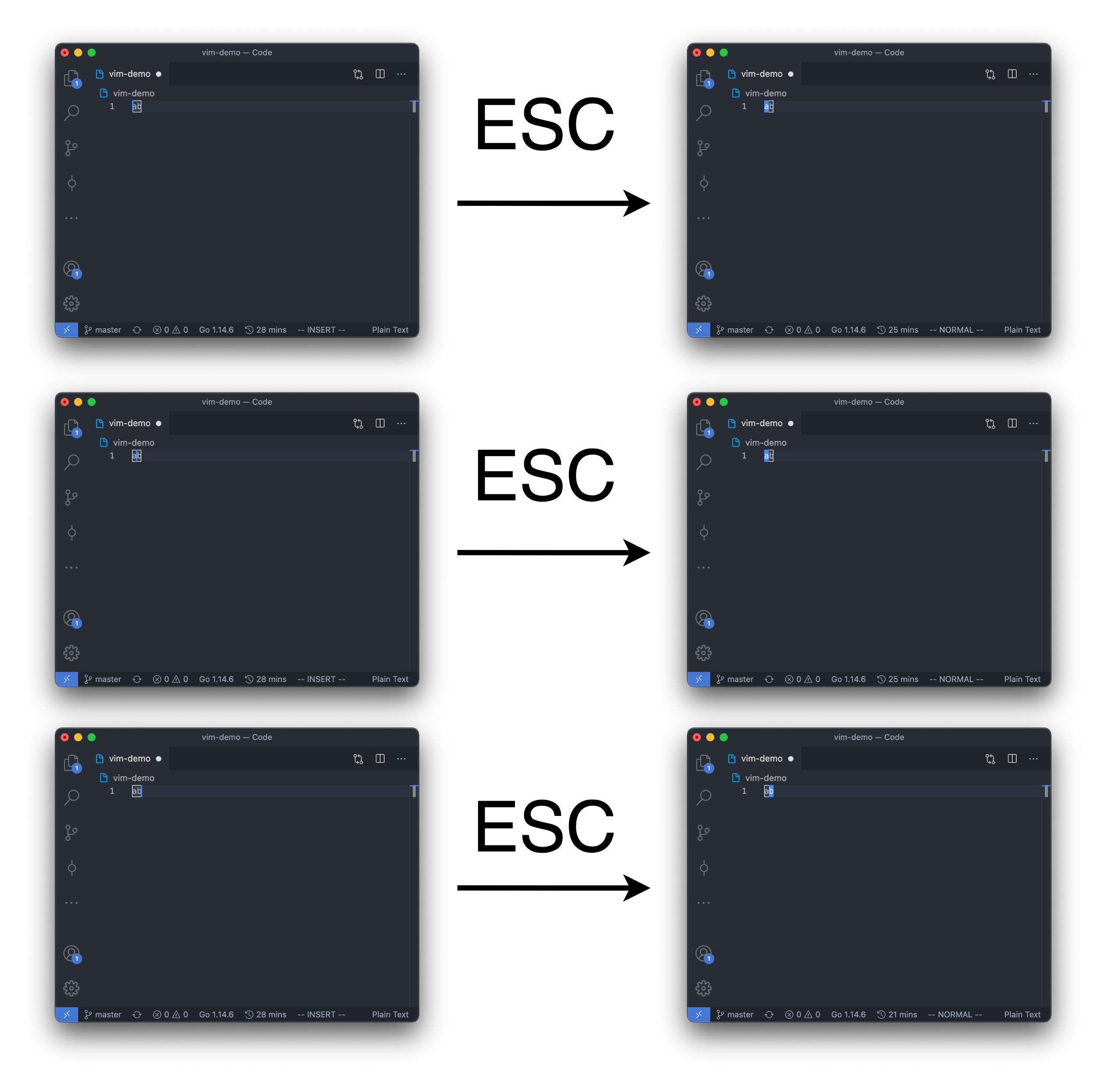
Note that for commands j, k, nj, nk:
At the time user entered command j, k, nj or nk,
if the cursor is at the 5th character(column) of the line(row),
then some continuous j, k, nj, nk commands will remains the cursor at the 5th character of the line, too, if exists,
else, if not exists, the cursor will be at the end of the line(at the last character if the line is not empty).
And if any commands except j, k, nj, nk are entered,
then the next j, k, nj, nk command will not be continuous with the current j, k, nj, nk command.
So the j and k in commands "jhk" are not continuous,
but ESC is not a command, so the j and k in commands "jESCk" are continuous.
Please see the example below.
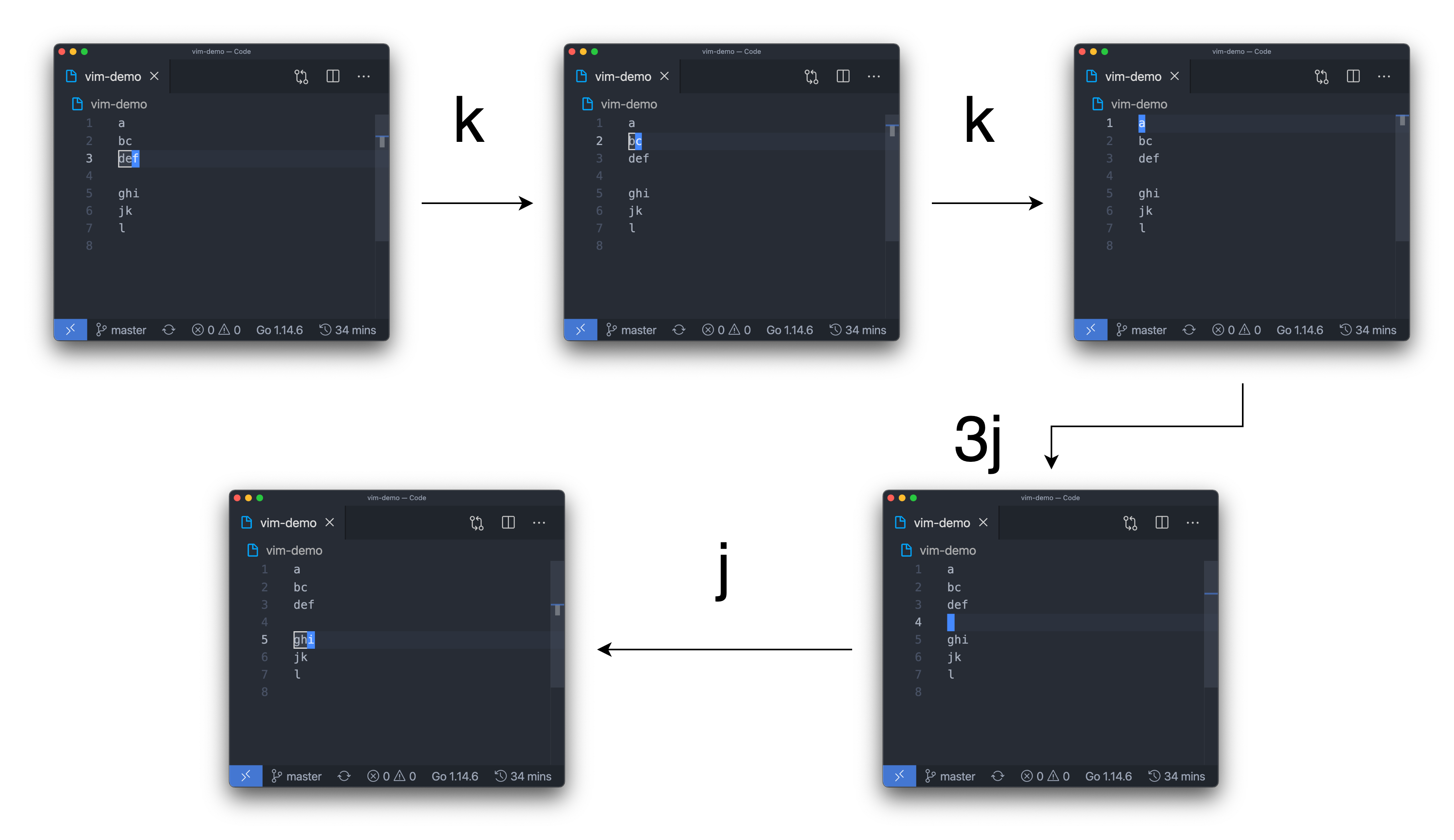
You should make sure that the cursor is in line 1 to line 1000.
So entered command j in when the cursor is at line 1000, or entered command k when the cursor is at line 0, will take no effect.
Note that some behavior may be different with the original Vim editor.
But you should follow the description instead of the behavior of the Vim editor.
Hint:
1. You can first finish your code by testcases, so that it is easier to debug and can get some points first.
2. Use malloc and free to dynamically allocate your array, or you may get MLE.
3. Any STL library is not allowed to used.
Input
The first line contains an integer T, represents that there are T testcases.
For each test case, there is only 1 line.
The line contains with a string S, represents the user input.
It is guaranteed that for all testcases:
- 1 <= T <= 25
- 1 <= |S| <= 2000
- In user mode, user only entered lowercase letters
- S always end with ":wq" (without quotes) and only end in command mode
- For command nh, nl, nx, nj, nk, ni, nI, nA, na, 2 <= n <= 100000
- All input data are valid
- At most 1.5 * 10^7 characters are inserted in each test case
For testcase #1, #2: No command j, k, nj, nk, na, nA, ni, nI. That is, same as problem #13083.
For testcase #3: No command nA, na, nI, ni.
For testcase #4, #5: No command j, k, nj, nk.
Output
For each testcase,
The first line, output "Case #{T}:", where {T} is the number of testcase, start from 1.
Start from the second line, output the result of the editor.
For outputing the result of the editor,
from line 1 to line 1000 of the editor,
if the line is not empty,
output "{i}: {line[i]}" where i is the number of line and line[i] is the result of the editor on line i.